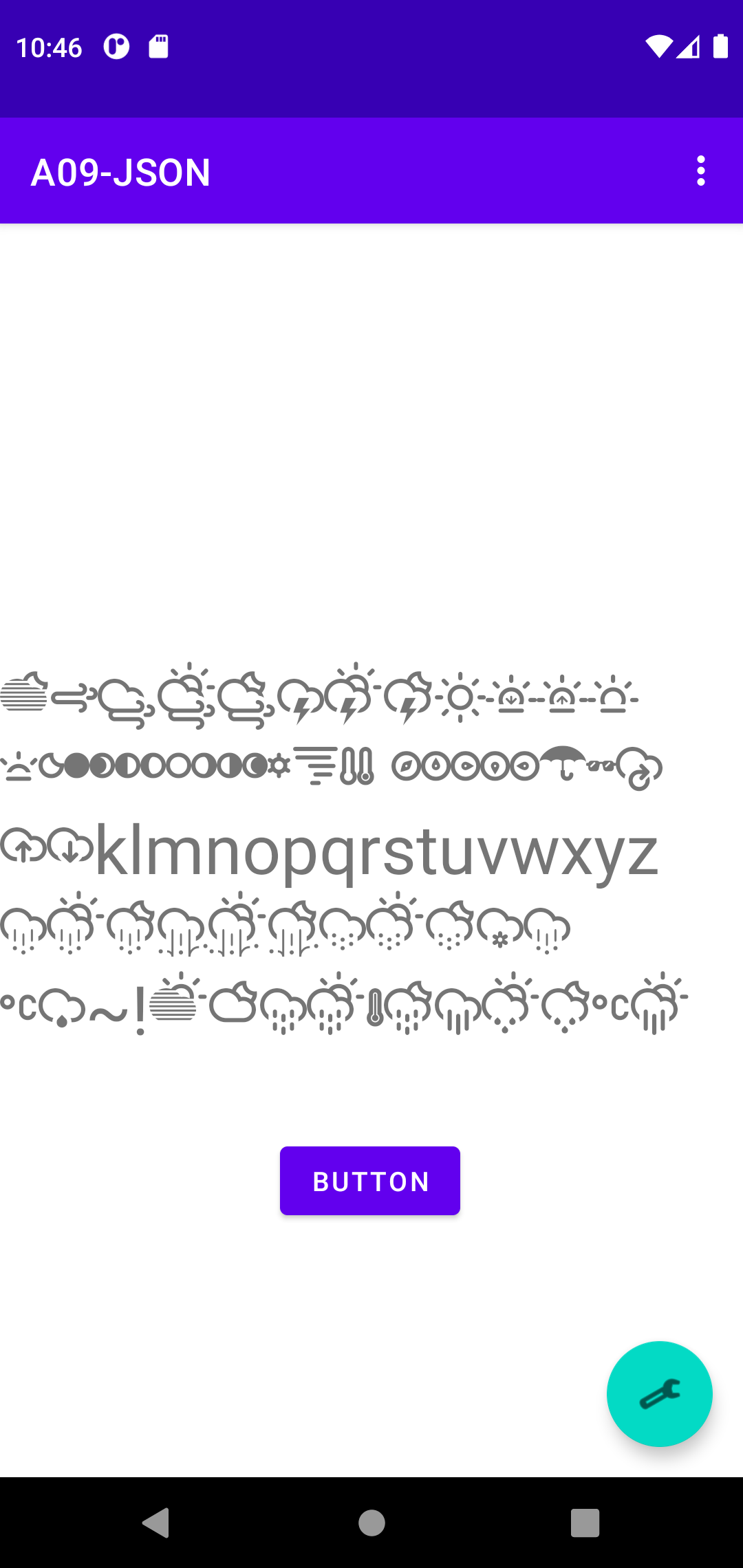
// right click res New->Folder->Font Folder, copy ttf file
final String TEMPLATE = "ABCDEFGHIJKLMNOPQRSTUVWXYZ abcdefghijklmnopqrstuvwxyz 01234567890 _-~!@#$%^&*()_+";
@Override
protected void onCreate(Bundle savedInstanceState) {
...
binding.textview.setText(TEMPLATE);
Typeface lv_customFont = ResourcesCompat.getFont(this, R.font.climacons);
binding.textview.setTypeface(lv_customFont);
binding.textview.setTextSize(TypedValue.COMPLEX_UNIT_SP,36);
2013 https://stackoverflow.com/questions/18480206/asynctask-vs-thread-in-android more... https://firebase.google.com/docs/reference/android/io/fabric/sdk/android/fabric/services/concurrency/AsyncTask Conclusion: AsyncTask enables proper and easy use of the UI thread. Therefore, this tutorial was considered 'obsolete' http://www.tutorialspoint.com/android/android_network_connection.htm 2021 https://developer.android.com/reference/android/os/AsyncTask Conclusion:AsyncTask was intended to enable proper and easy use of the UI thread. However, the most common use case was for integrating into UI, and that would cause Context leaks, missed callbacks, or crashes on configuration changes. more https://www.techyourchance.com/asynctask-deprecated/ Therefore, this tutorial is considered 'modern' http://www.tutorialspoint.com/android/android_network_connection.htm
https://www.toptal.com/android/android-threading-all-you-need-to-know Every Android developer, at one point or another, needs to deal with threads in their application. When an application is launched in Android, it creates the first thread of execution, known as the “main” thread. The main thread is responsible for dispatching events to the appropriate user interface widgets as well as communicating with components from the Android UI toolkit. To keep your application responsive, it is essential to avoid using the main thread to perform any operation that may end up keeping it blocked.
To perform network operations in your application, your manifest must include the following permissions: < uses-permission android:name="android.permission.INTERNET" /> < uses-permission android:name="android.permission.ACCESS_NETWORK_STATE" />
public class MainActivity extends AppCompatActivity {
TextView cv_tvHello;
@Override
protected void onCreate(Bundle savedInstanceState) {
super.onCreate(savedInstanceState);
setContentView(R.layout.activity_main);
Toolbar toolbar = (Toolbar) findViewById(R.id.toolbar);
setSupportActionBar(toolbar);
cv_tvHello = (TextView) findViewById(R.id.vv_tvHello);
FloatingActionButton fab = (FloatingActionButton) findViewById(R.id.fab);
fab.setOnClickListener(new View.OnClickListener() {
@Override
public void onClick(View view) {
String stringUrl = "http://ziptasticapi.com/48197";
ConnectivityManager connMgr = (ConnectivityManager)
getSystemService(Context.CONNECTIVITY_SERVICE);
NetworkInfo networkInfo = connMgr.getActiveNetworkInfo();
if (networkInfo != null && networkInfo.isConnected()) {
new DownloadWebpageTask().execute(stringUrl);
} else {
cv_tvHello.setText("No network connection available.");
}
}
});
}
// Uses AsyncTask to create a task away from the main UI thread. This task takes a
// URL string and uses it to create an HttpUrlConnection. Once the connection
// has been established, the AsyncTask downloads the contents of the webpage as
// an InputStream. Finally, the InputStream is converted into a string, which is
// displayed in the UI by the AsyncTask's onPostExecute method.
private class DownloadWebpageTask extends AsyncTask {
@Override
protected String doInBackground(String... urls) {
// params comes from the execute() call: params[0] is the url.
try {
return downloadUrl(urls[0]);
} catch (IOException e) {
return "Unable to retrieve web page. URL may be invalid.";
}
}
// onPostExecute displays the results of the AsyncTask.
@Override
protected void onPostExecute(String result) {
cv_tvHello.setText(result);
}
// Given a URL, establishes an HttpUrlConnection and retrieves
// the web page content as a InputStream, which it returns as
// a string.
private String downloadUrl(String myurl) throws IOException {
InputStream is = null;
// Only display the first 500 characters of the retrieved
// web page content.
int len = 500;
try {
URL url = new URL(myurl);
HttpURLConnection conn = (HttpURLConnection) url.openConnection();
conn.setReadTimeout(10000 /* milliseconds */);
conn.setConnectTimeout(15000 /* milliseconds */);
conn.setRequestMethod("GET");
conn.setDoInput(true);
// Starts the query
conn.connect();
int response = conn.getResponseCode();
////Log.d(DEBUG_TAG, "The response is: " + response);
is = conn.getInputStream();
// Convert the InputStream into a string
String contentAsString = readIt(is, len);
return contentAsString;
// Makes sure that the InputStream is closed after the app is
// finished using it.
} finally {
if (is != null) {
is.close();
}
}
}
// Reads an InputStream and converts it to a String.
public String readIt(InputStream stream, int len) throws IOException, UnsupportedEncodingException {
Reader reader = null;
reader = new InputStreamReader(stream, "UTF-8");
char[] buffer = new char[len];
reader.read(buffer);
return new String(buffer);
}
}
https://stackoverflow.com/questions/58767733/the-asynctask-api-is-deprecated-in-android-11-what-are-the-alternatives
https://www.geeksforgeeks.org/alternatives-for-the-deprecated-asynctask-in-android/
new Thread(new Runnable() {
@Override
public void run() {
// do your stuff
runOnUiThread(new Runnable() {
public void run() {
// do onPostExecute stuff
}
});
}
}).start();
< uses-permission android:name="android.permission.INTERNET" />
...
import com.example.a09_json.databinding.ActivityMainBinding;
import android.view.View;
import android.content.Context;
import org.json.simple.JSONArray;
import org.json.simple.JSONObject;
import org.json.simple.parser.JSONParser;
import org.json.simple.parser.ParseException;
import java.io.BufferedReader;
import java.io.IOException;
import java.io.InputStream;
import java.io.InputStreamReader;
import java.net.HttpURLConnection;
import java.net.URL;
public class MainActivity extends AppCompatActivity {
private ActivityMainBinding binding;
final String stringUrl = "https://ziptasticapi.com/48197";
String json = "";
@Override
protected void onCreate(Bundle savedInstanceState) {
...
binding.button.setOnClickListener(
new View.OnClickListener() {
@Override
public void onClick(View view) {
Context ctx = MainActivity.this;
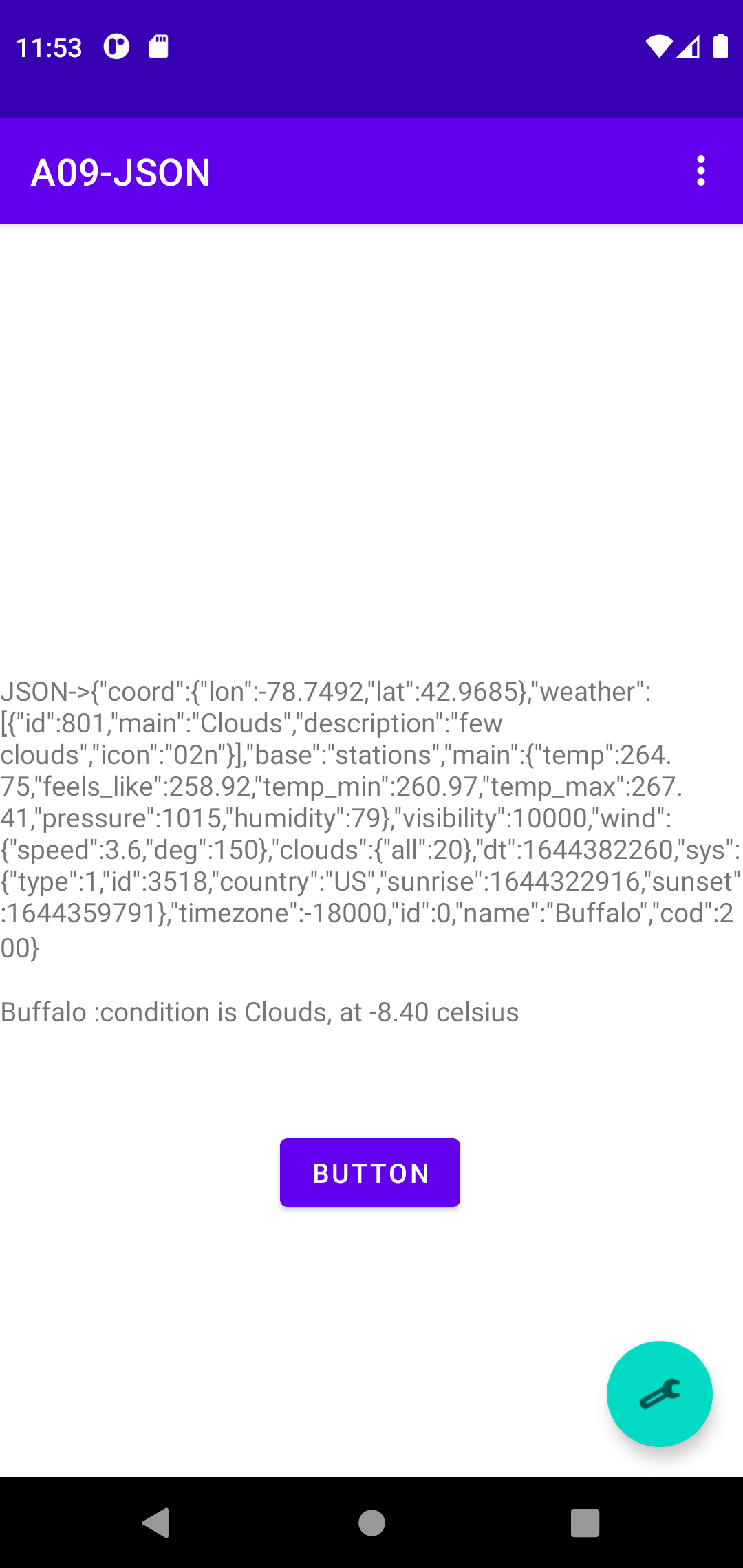
binding.textview.setText( "JSON->" + json + "\n\n" + parseJson(json) );
}
});
binding.floatingActionButton.setOnClickListener(new View.OnClickListener() {
@Override
public void onClick(View view) {
httpInThread(stringUrl);
}
});
}
...
private void httpInThread(String url) {
new Thread(new Runnable() {
String result = "HTTPS unable to get";
@Override
public void run() {
// do your stuff
try {
result = downloadUrl(url);
} catch (IOException e) {
binding.textview.setText("Unable to retrieve web page. URL may be invalid.");
return;
}
runOnUiThread(new Runnable() {
public void run() {
// do onPostExecute stuff
binding.textview.setText(result);
json = result;
}
});
}
}).start();
}
private String downloadUrl(String urlString) throws IOException {
String result = "Download https error";
InputStream in = null;
BufferedReader reader = null;
try {
URL url = new URL(urlString);
HttpURLConnection conn = (HttpURLConnection) url.openConnection();
conn.connect();
in = conn.getInputStream();
StringBuilder stringBuilder = new StringBuilder();
reader = new BufferedReader(new InputStreamReader(in));
String line;
while ((line = reader.readLine()) != null) {
stringBuilder.append(line);
}
result = stringBuilder.toString();
} catch (IOException e) {
} finally {
if(in != null)
try {
in.close();
reader.close();
} catch (IOException e) {
}
}
return result;
}
}
<androidx.constraintlayout.widget.ConstraintLayout xmlns:android="http://schemas.android.com/apk/res/android"
xmlns:app="http://schemas.android.com/apk/res-auto"
xmlns:tools="http://schemas.android.com/tools"
android:layout_width="match_parent"
android:layout_height="match_parent"
tools:context=".MainActivity">
<TextView
android:id="@+id/textview"
android:layout_width="wrap_content"
android:layout_height="wrap_content"
android:text="RecyclerView List Example 01"
app:layout_constraintBottom_toBottomOf="parent"
app:layout_constraintLeft_toLeftOf="parent"
app:layout_constraintRight_toRightOf="parent"
app:layout_constraintTop_toTopOf="parent"
app:layout_constraintVertical_bias="0.022" />
<androidx.recyclerview.widget.RecyclerView
android:id="@+id/recyclerview"
android:layout_width="wrap_content"
android:layout_height="0dp"
android:layout_marginStart="16dp"
android:layout_marginTop="24dp"
android:layout_marginEnd="16dp"
android:layout_marginBottom="16dp"
app:layout_constraintBottom_toBottomOf="parent"
app:layout_constraintEnd_toEndOf="parent"
app:layout_constraintStart_toStartOf="parent"
app:layout_constraintTop_toBottomOf="@+id/textview" />
</androidx.constraintlayout.widget.ConstraintLayout>
<LinearLayout xmlns:android="http://schemas.android.com/apk/res/android"
android:layout_width="match_parent"
android:layout_height="46dp">
<TextView
android:layout_width="wrap_content"
android:layout_height="wrap_content"
android:id="@+id/celltextview"
android:text="TextView"
android:textSize="16dp" />
</LinearLayout>
import androidx.appcompat.app.AppCompatActivity;
import androidx.recyclerview.widget.LinearLayoutManager;
import androidx.recyclerview.widget.RecyclerView;
import android.os.Bundle;
public class MainActivity extends AppCompatActivity {
@Override
protected void onCreate(Bundle savedInstanceState) {
super.onCreate(savedInstanceState);
setContentView(R.layout.activity_main);
RecyclerView recyclerView = findViewById(R.id.recyclerview);
recyclerView.setLayoutManager(new LinearLayoutManager(this));
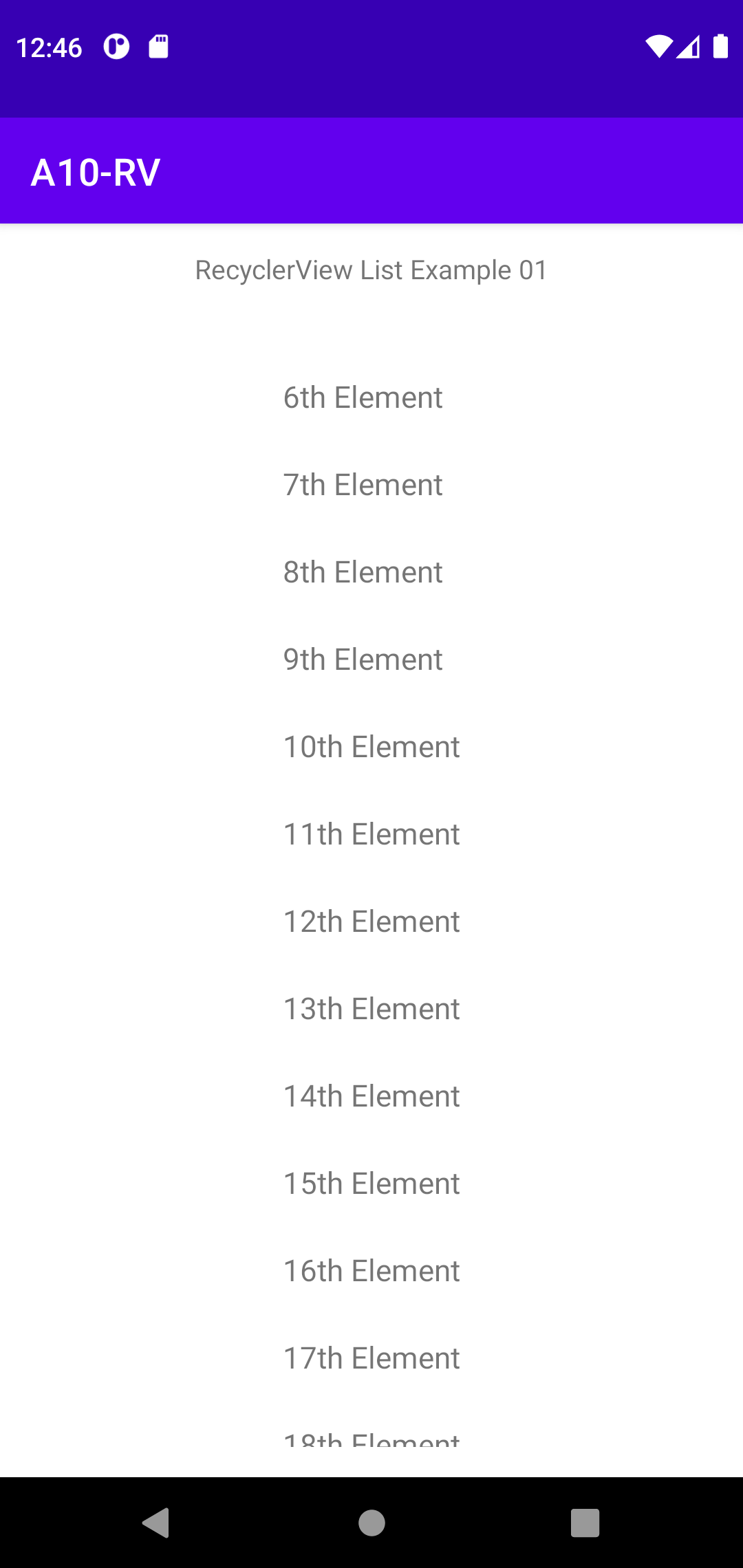
String[] data = new String[32];
for (int i = 0; i < 32; i++) {
data[i] = i+"th Element";
}
recyclerView.setAdapter(new RecyclerViewAdapter(data));
}
}
import android.view.LayoutInflater;
import android.view.View;
import android.view.ViewGroup;
import android.widget.TextView;
import androidx.recyclerview.widget.RecyclerView;
public class RecyclerViewAdapter extends RecyclerView.Adapter<RecyclerViewAdapter.ViewHolder> {
private String[] data;
public static class ViewHolder extends RecyclerView.ViewHolder {
private final TextView textView;
public ViewHolder(View view) {
super(view);
// Define click listener for the ViewHolder's View
textView = (TextView) view.findViewById(R.id.celltextview);
}
public TextView getTextView() {
return textView;
}
}
public RecyclerViewAdapter (String[] data){
this.data = data;
}
@Override
public ViewHolder onCreateViewHolder(ViewGroup viewGroup, int viewType) {
// Create a new view, which defines the UI of the list item
View view = LayoutInflater.from(viewGroup.getContext())
.inflate(R.layout.recyclerview_row, viewGroup, false);
return new ViewHolder(view);
}
// Replace the contents of a view (invoked by the layout manager)
@Override
public void onBindViewHolder(ViewHolder holder, int position) {
// Get element from your dataset at this position and replace the
// contents of the view with that element
holder.textView.setText(data[position]);
}
// Return the size of your dataset (invoked by the layout manager)
@Override
public int getItemCount() {
return data.length;
}
}